Autor: hk

  • Exporting von STEP Dateien mit benannten Oberflächen aus PTC CREO

    Exporting von STEP Dateien mit benannten Oberflächen aus PTC CREO

    When preparing geometry for numerical simulations, it is often required to mark individual surfaces in the model. These surfaces can then be used e.g. as an inlet or forces and pressures can be applied in a structural simulation.

    The STEP format supports named entities. The question is: how to set the names in the CAD program? And how to achieve that they are actually stored in the STEP file? In the following, these questions are answered for the software PTC Creo.

    Assign Names to Surfaces

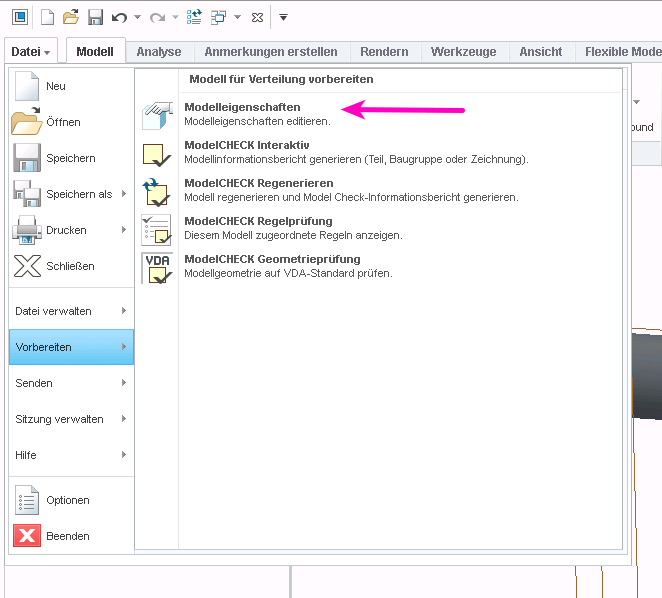
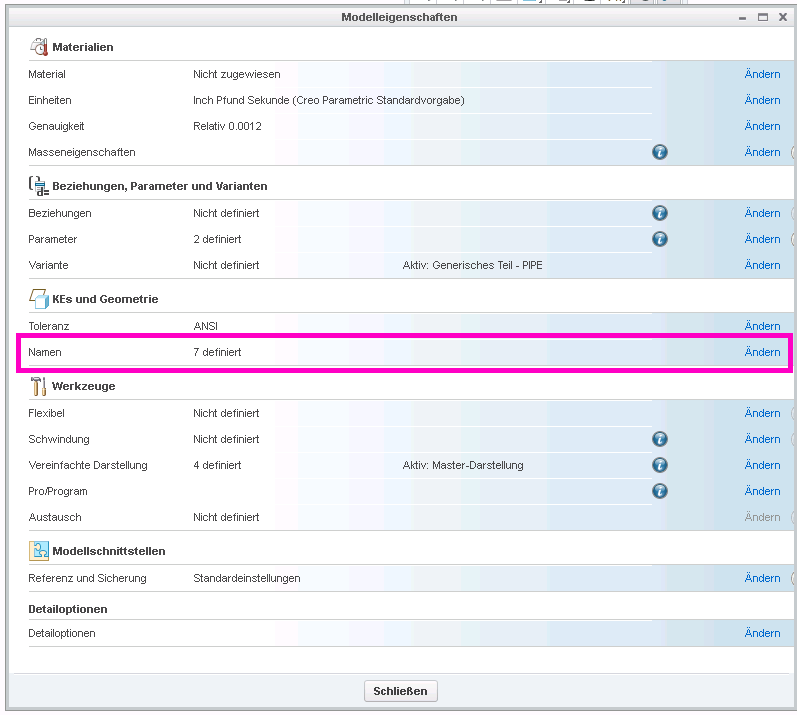
    Select “File” > “Prepare” and then “Open Model Properties”, then select “Names” in the model properties dialog:
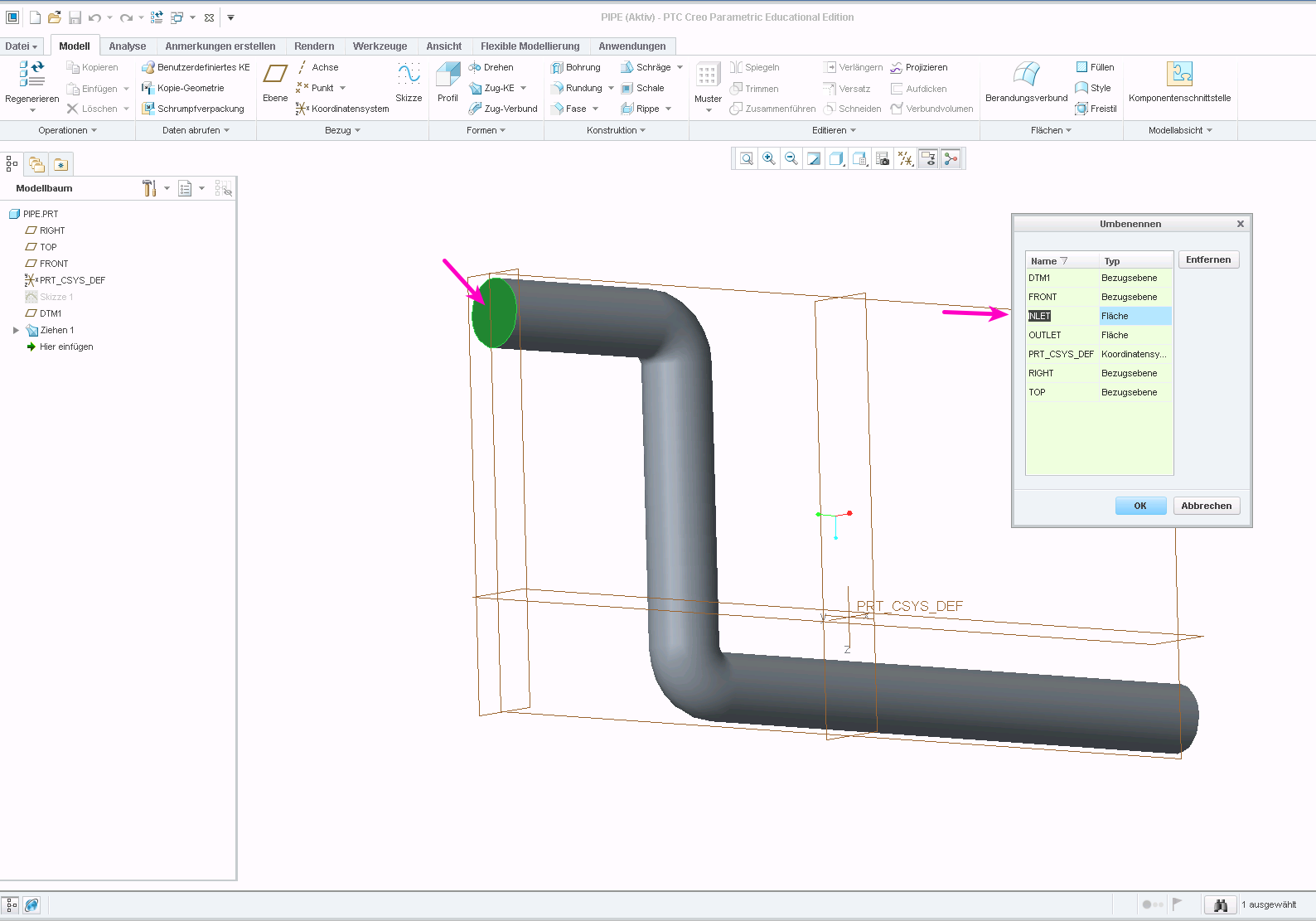
    You can then select faces by clicking on them and enter a name in the dialog box:
    PTC Creo assign name to face or surface

    Exporting Names in STEP File

    If export a STP file with the default settings, the names will not be stored in the file. You need to change the export setup for them to be kept.

    Open the settings dialog through “File” > “Options”. Then go to “Configuration Editor”. Here, you need to add the option “intf_out_assign_names” and set it to “user_name”.
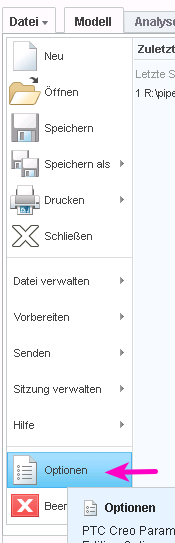
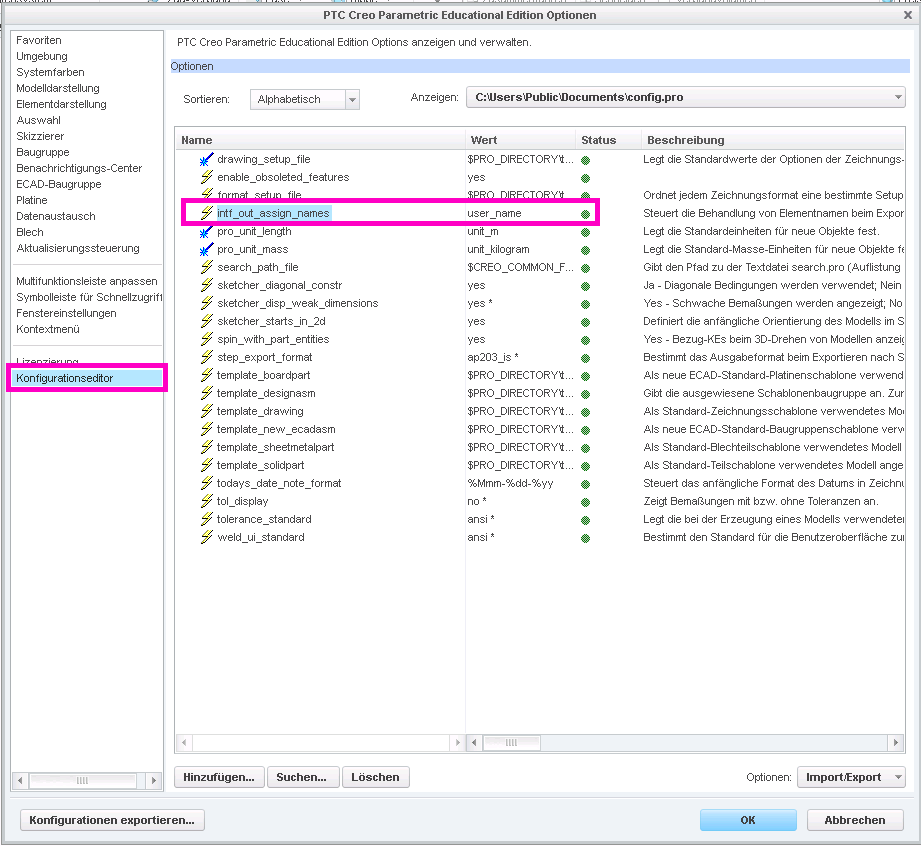
    PTC Creo STEP export settings

    Accessing the Named Entity in ISCAD

    It is now possible to access the faces through the assigned names, e.g. in ISCAD. Once the STEP file is imported, its sub-entities can be explored by typing Ctrl-I (see below). The named faces appear as “face_<NAME>” int the hierarchy:
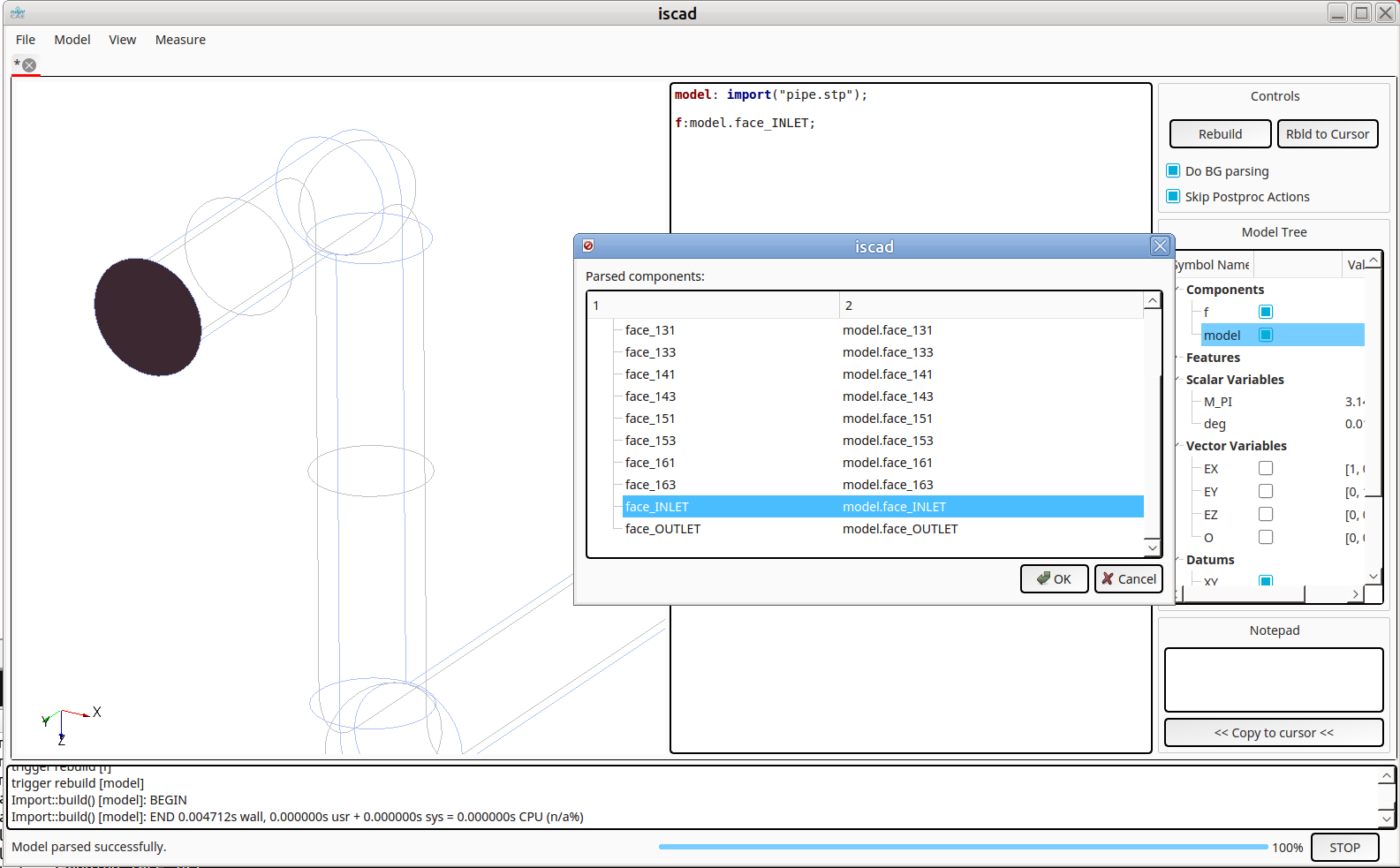
    InsightCAE ISCAD import STP with named faces
  • Vektoranalysis in der Bash Shell

    When performing preparatory operations for e.g. CFD or FEM analyses, it is often necessary to specify vector parameters. Vector constants are easy to handle:

    DIR="1 0 0"
    
    myMesh --direction "$DIR"

    However, it quickly becomes complicated if the vectors have to be manipulated, e.g. multiplied by scalars or rotated.

    A powerful solution is to use the Matlab Octave clone to perform the operations. Two features of octave are useful in this context:

    • the command line option “–eval” to specify the expression to handle
    • the function “disp” to output the results in plain format in a single line

    An example:

    DIR="1 0 0"
    VELOCITY=$(octave --eval "disp( 11.*[$DIR] )")
    
    myMesh --direction "$DIR"
    mySolver --velocity "$VELOCITY"

    More complicated operation are possible. Though one needs to take care to produce line vectors as results. Rotation as an example:

    DIR="1 0 0"
    ANG=45
    
    DIR_ROT=$(octave --eval "pkg load linear-algebra; disp( (rotv([0 0 1], $ANG*pi/180)*[$DIR]')' )")
    
    myMesh --direction "$DIR_ROT"
  • Simulation der Entgasung von Flüssigkeiten mit OpenFOAM

    Simulation der Entgasung von Flüssigkeiten mit OpenFOAM

    Platzmangel und hoher Kostendruck führen letztlich dazu, dass Hydrauliktanks immer komplexer und kleiner werden. Dies führt zu einer drastischen Verringerung der Luftabscheidung im Tank – und damit zu einem erhöhten Anteil an freier Luft im Hydrauliksystem.

    In hydraulischen Systemen ist die freie Luft auch heute noch eine technische Herausforderung. Solange die Luft im Öl gelöst ist, verändert sie dessen Eigenschaften nicht.

    Ungelöste Luft hingegen, d. h. Luftblasen, verursachen:

    Korrosion an Pumpen und Steuerungen
    Verringerung des Wirkungsgrades von Pumpen und Hydromotoren, erhöhte Kompressibilität und damit mögliche stotternde Bewegungen im Antrieb. Zusätzlich kommt es zu 

    • Beschleunigte Ölalterung
    • Geräuscherhöhung
    • Beschädigung der Bauteile (z.B. Kavitation)
    • etc.

    Die Luft gelangt bei Montagearbeiten, durch Leckagen im Unterdruckbereich und beim Zurückfließen des Öls in den Behälter in den Kreislauf. Je nach Abscheideleistung des Filter-Tank-Systems steigt die Luft im Behälter nur langsam auf und wird von der Pumpe wieder angesaugt.

    Simulation in Luft-Flüssigkeitsbehältern

    Silentdynamics verwendet InsightCAE, um eine Reihe von Simulationen von dispersen Gasblasen in einem Entgasungstank durchzuführen. Die Anwendung des Solvers twoPhaseEulerFoam ermöglicht die instationäre Verfolgung der Gasphase, der Integralwerte der Luft an den Auslässen und der Gesamtqualität der Entgasungsvorrichtung. 

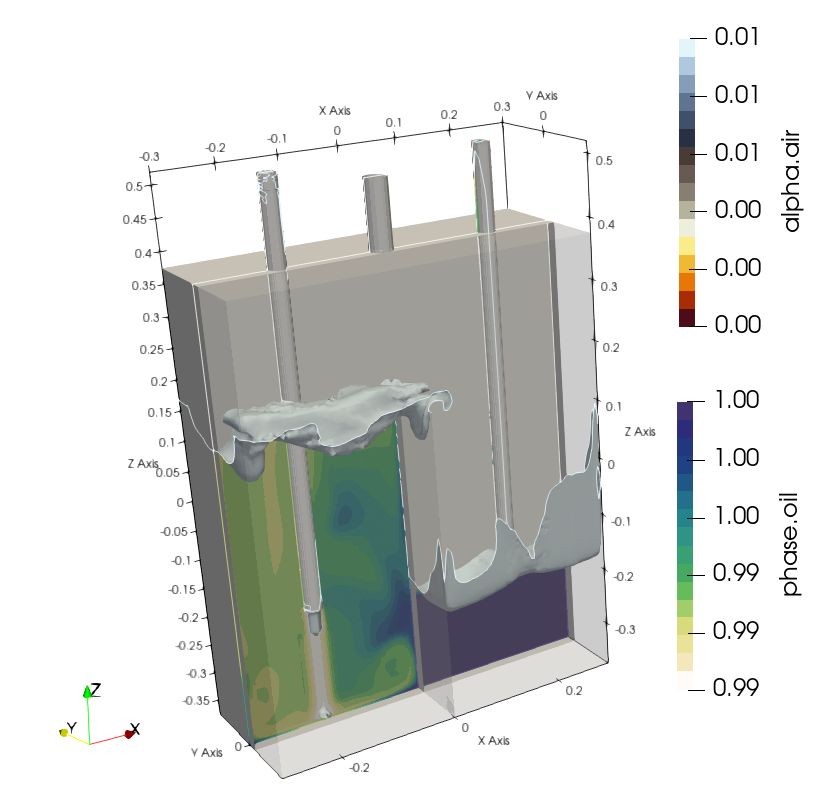
    Als Beispiel wird ein einfaches Entgasungsbeispiel vorgestellt. Ein Einlass und zwei Auslässe einschließlich eines Verschleißes in der Mitte. Das Öl-Gas-Gemisch bewegt sich zur Entgasung über den Verschleiß.


    Nach Einstellung der Gas-Öl-Dispersions-Randbedingungen wie Gasblasengröße, Mischungskoeffizienten, phaseProperties, etc. konnte die Simulation mit twoPhaseEulerFoam gestartet werden.

    Mit Hilfe der erweiterten Solver-Einstellungen im Rahmen von InsightCAE werden große Zeitschritte ermöglicht, um die Simulationen in einer angemessenen Zeit durchzuführen.

    Isoflächen von bei einem Gasphasenanteil von 1%.


    Die Änderung der Geometrie des Entgasungstanks mit Hilfe der numerischen Simulation führt zu einem ausreichenden Entgasungsprozess des Hydrauliköls.

  • Simulation Elektronik Kühlung mit OpenFOAM

    Simulation Elektronik Kühlung mit OpenFOAM

    Der begrenzte Platz und die hohe Leistungsaufnahme führen schließlich zu einem innovativen Kühlungsdesign für eine breite Palette von Leiterplatten. Die Anordnung der Stromversorgungen, die Abmessungen der Kühlkörper und das Design des Außengehäuses gewinnen an Bedeutung. Thermische Simulationen während des Entwurfsprozesses von Leiterplatten helfen, Überhitzungsprobleme in der späteren Produktionsphase zu vermeiden. 

    Unterschiedliche Materialien, die Kombination von Wärmeleitung, Konvektion und Strahlung in Festkörpern und Luft führen zu einer ziemlich komplexen thermischen Simulation. Die Einstellung von Materialeigenschaften, Randbedingungen, Solver-Einstellungen und Kopplungsbereichen nimmt oft einen nicht geringen Zeitaufwand in Anspruch.

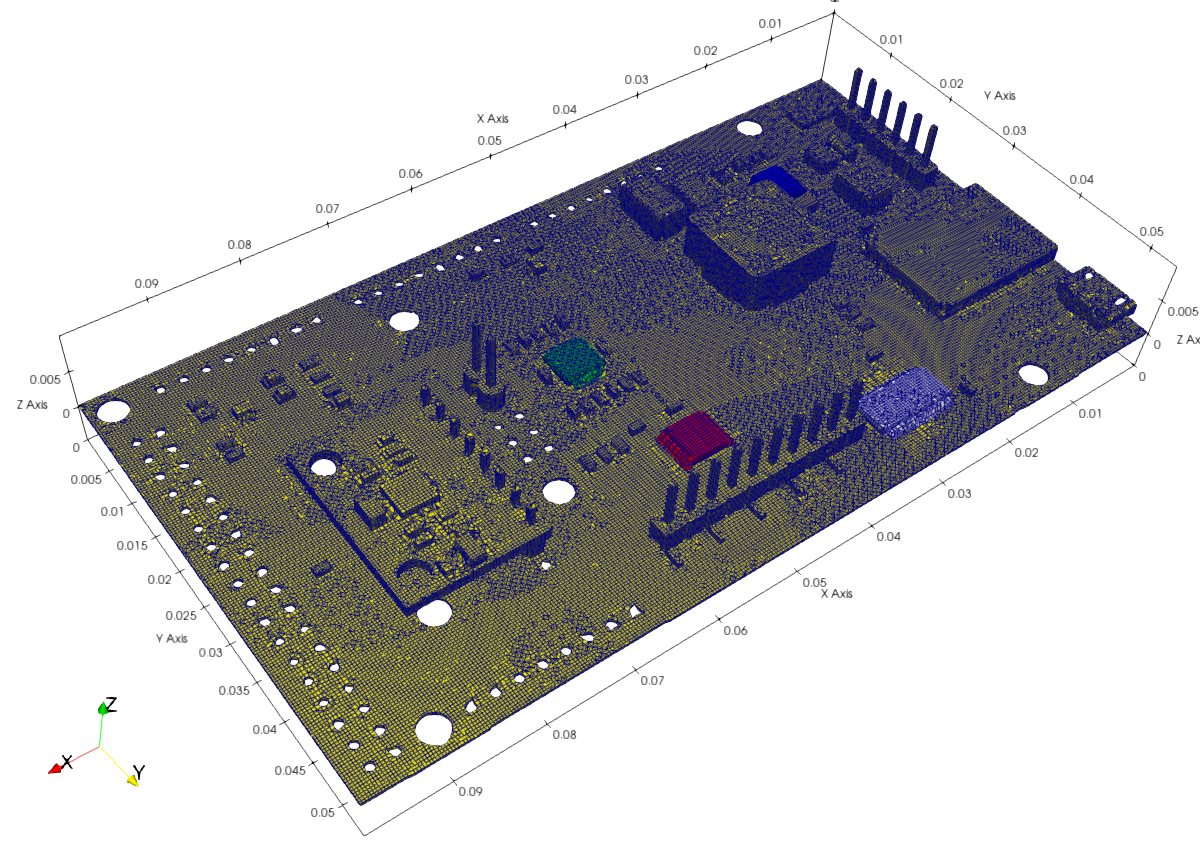
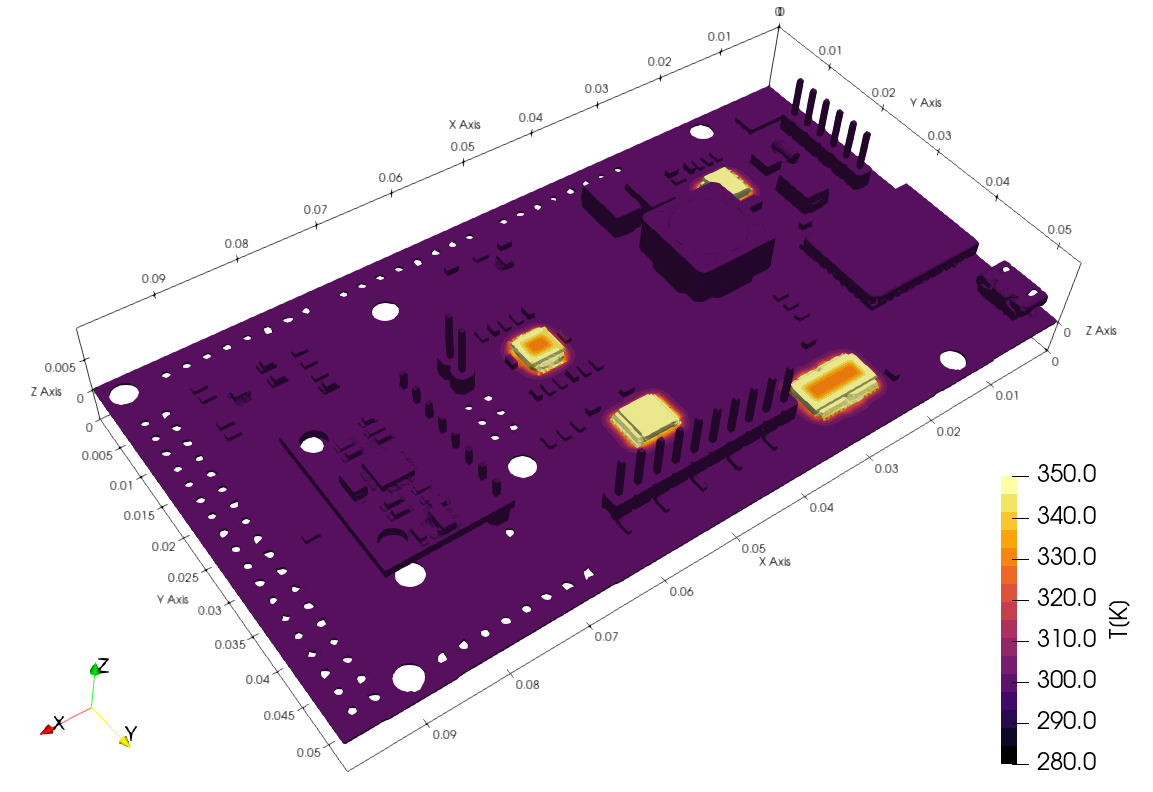
    Als Beispiel wird eine typische Leiterplatte mit ihren Komponenten vorgestellt.

    Thermische Simulation 

    Silentdynamics hat es geschafft, das Simulations-Setup unter Verwendung von OpenFOAM thermischen Solvern (chtMultiRegionFoam, chtMultiRegionSimpleFoam) innerhalb des Frameworks InsightCAE für ein schnelles Preprocessing zu bündeln.

    Der Import von CAD-Dateien für jedes Bauteil und der optimierte Prozess der parallelen Vernetzung der Regionen mit snappyHexMesh sind für die konservative thermische Kopplung der verschiedenen Regionen unerlässlich.

    Beachten Sie, dass die Verwendung von verschiedenen VIAs, Kupferdrähten, Wärmeleitschichten oder anderen wärmebezogenen Punkten im Simulationsmodell berücksichtigt werden muss. Mit Hilfe von Regionsmodellierung, CellSet’s und Schichtdefinition für jedes Bauteil können alle erforderlichen thermischen Eigenschaften berücksichtigt werden.

    Durch die Möglichkeit, spezielle Platzhalter zu definieren, ist der Aufbau der CHT-Simulation nahezu automatisiert. 

    Darüber hinaus bilden eine verbesserte Behandlung der Wärmestrahlung und optimierte Solvereinstellungen die Grundlage für stabile und konvergente Simulationen. 

  • Electronic cooling simulation using OpenFOAM

    Electronic cooling simulation using OpenFOAM

    Space limitations and high power supply ultimately lead to innovativ cooling design for a wide range of PCB. The arrangement of the power supply’s, heat sink dimensions and design of the outer housing become more important. Thermal simulations within in the design process of PCB help to overcome overheating problems in the later production stage. 

    Different materials, the combination of heat conduction, convective and radiative heat transfer within solids and air result in a fairly complex thermal simulation. The setup material properties, boundary conditions, solver settings, coupling regions ofter takes a not small time account.

    As example a typical PCB with its components is presented.

    Thermal simulation 

    Silentdynamics has managed to bundle the simulation setup using OpenFOAM thermal solvers (chtMultiRegionFoamchtMultiRegionSimpleFoam) within its framework InsightCAE for a fast preprocessing.

    Importing CAD files for each component and its optimized parallel region meshing process using snappyHexMesh are essential for the conservative flux coupling of the different heating regions.

    Notice, that the usage of different VIA’s, copper wires, heat conduction layers or other heat related points need to be adressed in simulation model. Using region modeling, cellSet’s and layer defintion for each component all required thermal properties can be considered.

    Allowing special defined wildcards, CHT simulation setup is nearly automated. 

    Moreover improved heat radiation handling and optimized solver settings are the basis of stable and convergent simulations. 

  • Degassing simulation using OpenFOAM

    Degassing simulation using OpenFOAM

    Space limitations and high cost pressure ultimately lead to hydraulic tanks becoming increasingly complex and smaller. This leads to a dramatic reduction in air separation in the tank – and thus to an increased amount of free air in the hydraulic system.

    In hydraulic systems, free air is still a technical challenge today. As long as the air is dissolved in the oil, it does not change its properties.

    On the other hand, undissolved air, d. H. Air bubbles, cause:

    • Corrosion on pumps and controls
    • Reduce the efficiency of pumps and hydraulic motors mincreased compressibility and thus possible stuttering movements of the output member
    • Accelerated oil aging
    • varnish noise
    • Damage to the components (e.g. cavitation)
    • etc.

    The air gets into the circuit during assembly work, through leaks in the negative pressure area and when the oil flows back into the container. Depending on the separation capacity of the filter-tank system, the air in the tank rises only slowly and is sucked in again by the pump.

    Simulation of air-liquid devices

    Silentdynamics uses InsightCAE to perform a number of simulations of dispersed gas bubbles in a degassing tank. Application of the solver twoPhaseEulerFoam enables the transient tracking of the gas phase, integral values of air at the outlets and overall the quality of the degassing device. 

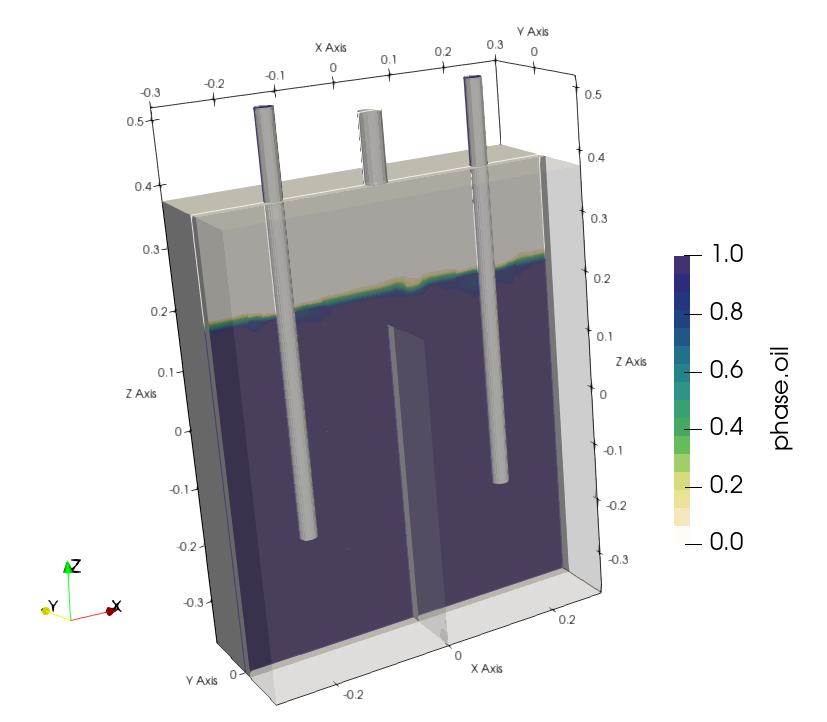
    As example a simple degassing example is presented . One inlet and two oulets including a wear at the center. Oil-gas mixture move over the wear for degassing.


    Setting up gas-oil dispersion boundary conditions as gas bubble size,  blending coefficients,  phaseProperties, etc. the simulation using twoPhaseEulerFoam could be initiated.

    Using advanced solver settings within the framework InsightCAE, large time steps are enabled to mangage simulations in a reasonable time.

    Isosurfaces of 1% gas are presented. 


    Changing of degassing tank geometry using numerical simulation leads to a sufficient degassing process of the hydraulic oil.

  • Vector Calculus in Bash Scripts

    When performing preparatory operations for e.g. CFD or FEM analyses, it is often necessary to specify vector parameters. Vector constants are easy to handle:

    DIR="1 0 0"
    
    myMesh --direction "$DIR"

    However, it quickly becomes complicated if the vectors have to be manipulated, e.g. multiplied by scalars or rotated.

    A powerful solution is to use the Matlab Octave clone to perform the operations. Two features of octave are useful in this context:

    • the command line option “–eval” to specify the expression to handle
    • the function “disp” to output the results in plain format in a single line

    An example:

    DIR="1 0 0"
    VELOCITY=$(octave --eval "disp( 11.*[$DIR] )")
    
    myMesh --direction "$DIR"
    mySolver --velocity "$VELOCITY"

    More complicated operation are possible. Though one needs to take care to produce line vectors as results. Rotation as an example:

    DIR="1 0 0"
    ANG=45
    
    DIR_ROT=$(octave --eval "pkg load linear-algebra; disp( (rotv([0 0 1], $ANG*pi/180)*[$DIR]')' )")
    
    myMesh --direction "$DIR_ROT"


  • Exporting a STEP file with named surfaces from PTC Creo

    Exporting a STEP file with named surfaces from PTC Creo

    When preparing geometry for numerical simulations, it is often required to mark individual surfaces in the model. These surfaces can then be used e.g. as an inlet or forces and pressures can be applied in a structural simulation.

    The STEP format supports named entities. The question is: how to set the names in the CAD program? And how to achieve that they are actually stored in the STEP file? In the following, these questions are answered for the software PTC Creo.

    Assign Names to Surfaces

    Select “File” > “Prepare” and then “Open Model Properties”, then select “Names” in the model properties dialog:


    You can then select faces by clicking on them and enter a name in the dialog box:

    PTC Creo assign name to face or surface

    Exporting Names in STEP File

    If export a STP file with the default settings, the names will not be stored in the file. You need to change the export setup for them to be kept.

    Open the settings dialog through “File” > “Options”. Then go to “Configuration Editor”. Here, you need to add the option “intf_out_assign_names” and set it to “user_name”.

    PTC Creo STEP export settings

    Accessing the Named Entity in ISCAD

    It is now possible to access the faces through the assigned names, e.g. in ISCAD. Once the STEP file is imported, its sub-entities can be explored by typing Ctrl-I (see below). The named faces appear as “face_<NAME>” int the hierarchy:
    InsightCAE ISCAD import STP with named faces

  • Importing IGES File (*.IGS) from FreeShip to OpenCASCADE

    Importing IGES File (*.IGS) from FreeShip to OpenCASCADE

    FreeShip software is a convenient tool for designing hulls.
    The capabilities of FreeShip are essentially limited to the design of the fuselage exterior. For everything else, a real CAD system is required. There is an IGES export function for the transfer.
    There is also a successor: DelftShip. The IGES export function has been removed from the free version of DelftShip and is only available in the commercial version. This is not available to me, so I cannot test it.
    I would like to use the geometry in our tool ISCAD. It is based on OpenCASCADE.
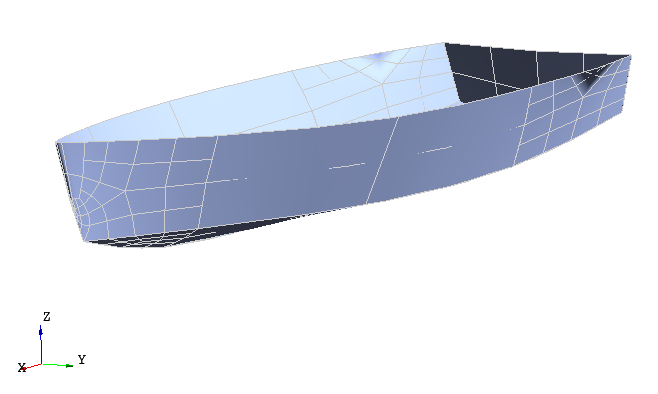
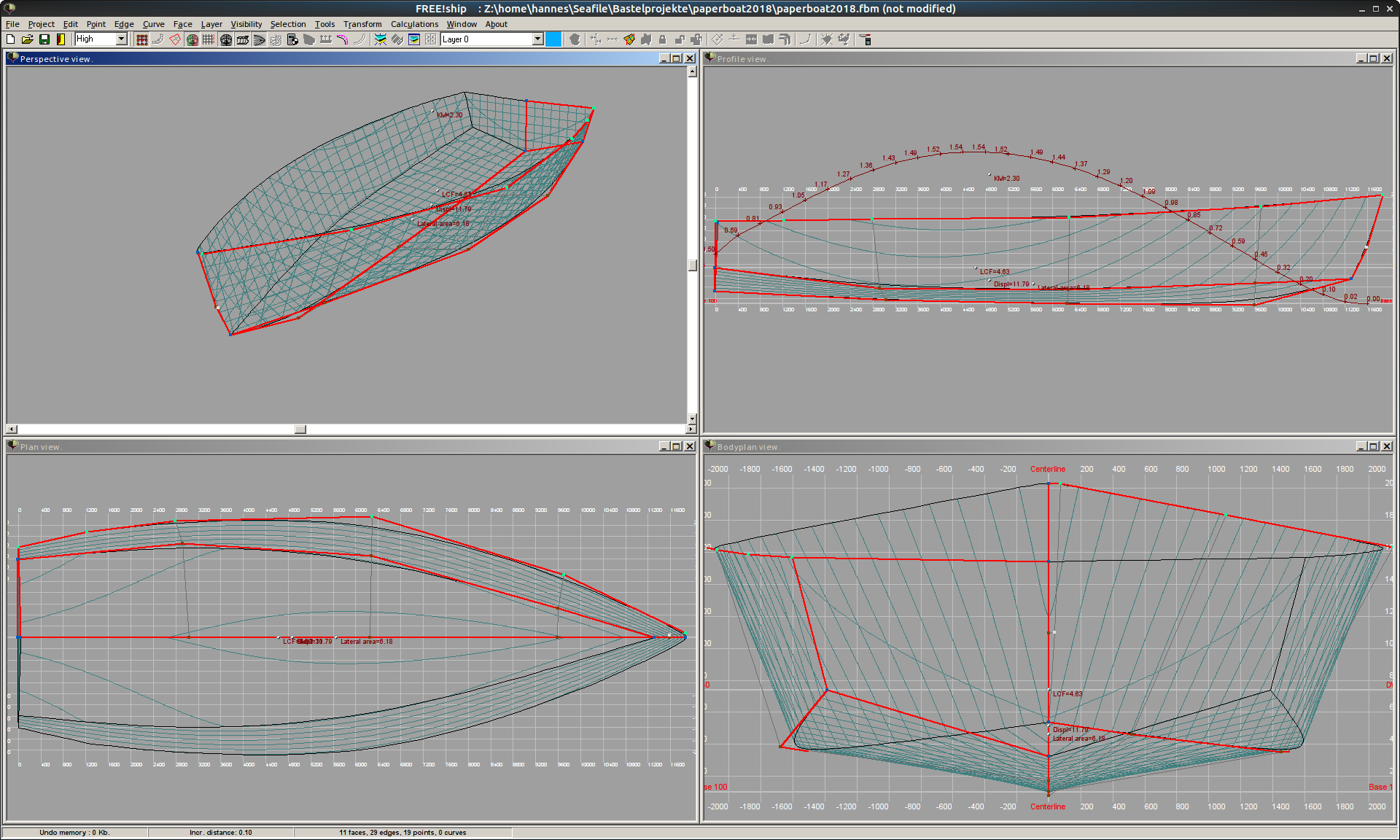
    The hull geometry modeled in FreeShip 2.6 looks like this:
    The export to an IGES file is unspectacular and 40 individual faces are created.
    The next step is the import into OpenCASCADE. But there is a problem here. OpenCASCADE (v7.2.0) reports:

    Report : 40 unknown entities.

    Total number of loaded entities 41.

    Nothing is displayed. Although it is reported that an import works with earlier versions (https://forum.freecadweb.org/viewtopic.php?t=1670), the import does not work with the current OCC version, nor with different older versions of Salome (and OpenCASCADE). On the other hand, the import works e.g. in the commercial CAD software Creo.

    Finally, a study shows that the file exported by FreeShip contains only entities of type 128 (spline surface). In addition, there is a single color definition at the beginning. At the end of the parameter block of a 128 surface (see e.g. https://wiki.eclipse.org/IGES_file_Specification#Rational_B-Spline_Surface_.28Type_128.29) are the start and end parameters (min/max U and V values) of the surface. These entries are omitted by FreeShip and for OpenCASCADE this is an error.

    One workaround is to patch the IGES import of OpenCASCADE. The corresponding code is located from line 188 in the file IGESGeom/IGESGeom_ToolBSplineSurface.cxx. I removed the error message and inserted default parameter limits:

      if (!PR.ReadReal(PR.Current(), aUmin) || !PR.ReadReal(PR.Current(), aVmin)){
        //Message_Msg Msg106("XSTEP_106");
        //PR.SendFail(Msg106);
        aUmin=0.0;
        aVmin=0.0;
      }
    
      if (!PR.ReadReal(PR.Current(), aUmax) || !PR.ReadReal(PR.Current(), aVmax)){
        //Message_Msg Msg107("XSTEP_107");
        //PR.SendFail(Msg107);
        aUmax=1.0;
        aVmax=1.0;
      }

    With these modifications, the import works:

de_DEGerman